
PDF, Word or scan · Up to 25 CVs per batch · Every field checked before saving · Flat-rate from €197/mo
The problem
Typing a CV into a database is a job nobody should still have
A seafarer's CV runs to three or four pages with twenty personal fields, a next of kin, a page of certificates with numbers and expiry dates, ten to thirty sea-service lines with vessel names, IMO numbers, tonnage, engine power and dates. Typed by hand, that is twenty to forty minutes per person. A wrong digit in an expiry date goes straight into the crew list or contract.
A crewing office receives dozens of CVs a week. Most never get entered. The candidate sits in an email folder until somebody has an hour spare and by then the vacancy is filled.
How it works
Import New CVs in Just 60 Seconds
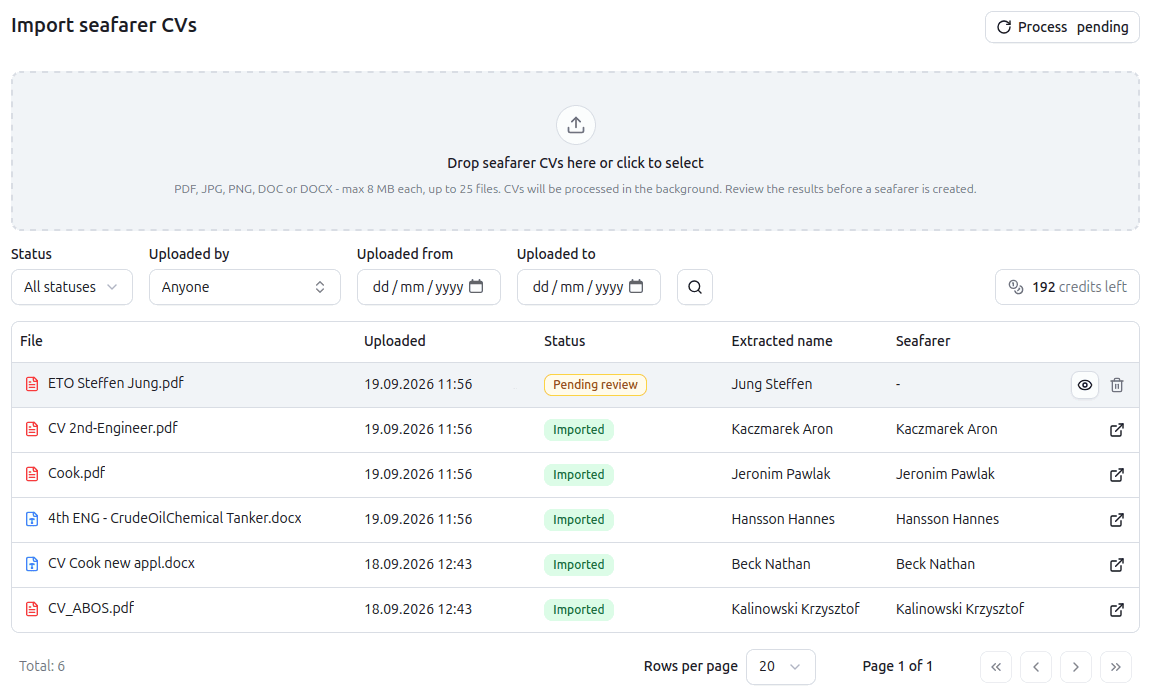
Upload
Up to 25 files at once
Upload up to 25 CVs at once from the Import CVs page. PDF, Word and image scans. Batch uploads run in the background while you carry on working.
Review and Save
Next to the original
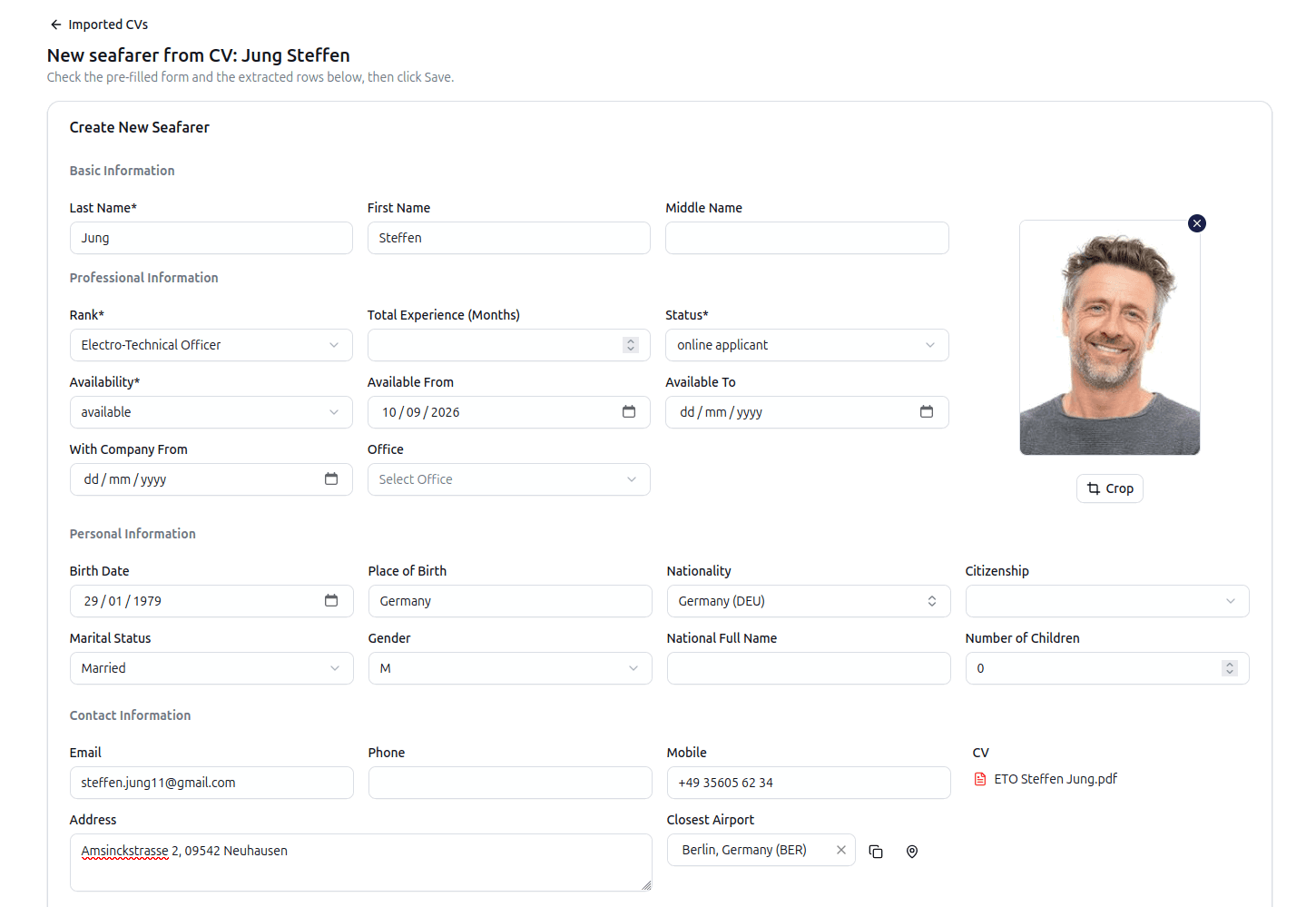
The extracted data opens next to the original CV. Untick anything you do not want. RiteCrew matches ranks to your rank list.
What gets extracted
What comes off the page
Everything a seafarer record holds, read from the CV and matched to your own lists.
Personal details
Surname, first and middle names, date and place of birth, nationality, gender, marital status, number of children, address, phone, mobile, email, nearest airport, current rank, available-from date, total sea time, personal ID number.
Next of kin
Name, relationship, phone, email and address. Saved as a contact on the NOK tab.
Sea service
For each line: vessel name, IMO number, vessel type, flag, build year, tonnage (DWT or GT), length overall, engine maker, model and power, DP class, rank held, sign-on and sign-off dates, employer and crewing company.
Certificates
Every certificate on the CV: name, number, issuing country, issue date and expiry date. RiteCrew matches each one to your certificate list. A certificate that is not in your list still comes through, with its name kept for you to map before saving.
Documents
Passport, seaman's book, visas and medical certificate, each with number, issuing country and dates.
Photo
If the CV carries a portrait, RiteCrew finds it and offers a crop. Accept it or adjust it and it becomes the profile photo.
Imported certificates and documents feed Crew Shield and the expiry reminders the moment they are saved and the record they land in is the same seafarer record that rotation planning and payroll read from.
Review
Every field has a tick box. The CV stays on screen.
The review dialog shows the CV on the left and the extracted fields on the right. Ranks are matched to your rank list, certificates to your certificate list. Anything unrecognised comes through with its name from the CV and a picker to map it.
- Untick a field and it is not written
- Unmatched ranks are left blank for you to pick
- Unmatched certificates keep their CV name until mapped
Existing seafarers
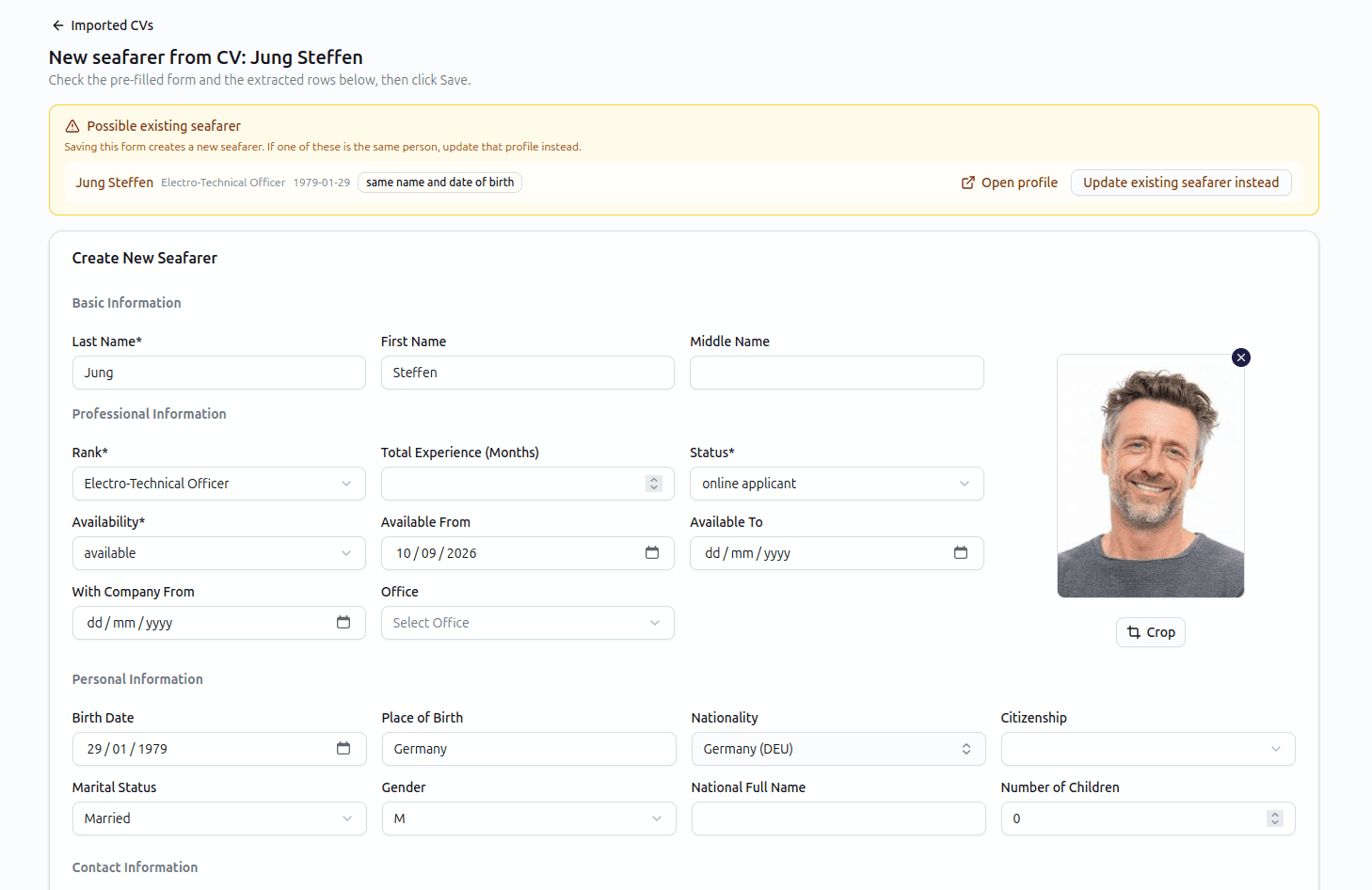
Updating a record never overwrites it.
Import a new CV onto a seafarer who is already in the database and RiteCrew ticks only the fields that are empty. Everything you already hold stays as it is unless you tick it yourself.
- A CV matching an existing seafarer by name and date of birth raises a banner before anything is created
Sea service
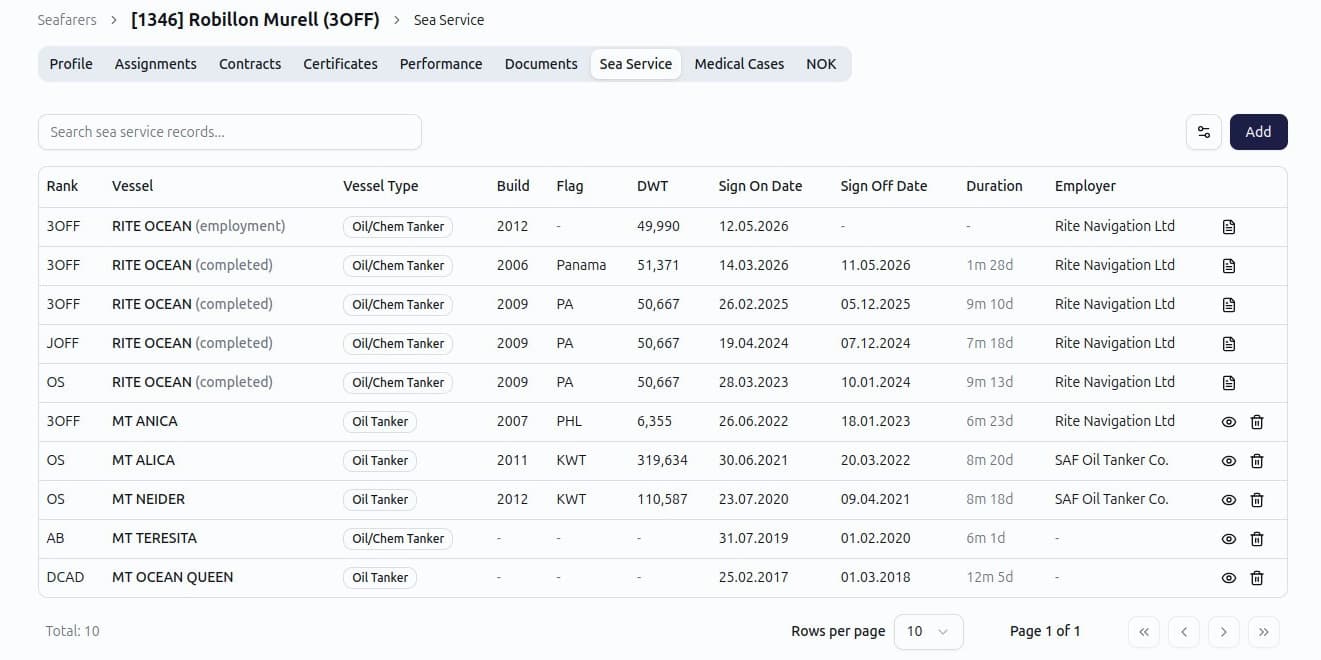
Import complete sea service records in seconds.
Each sea-service line arrives as its own row with the vessel, IMO number, type, flag, tonnage, rank held, dates and employer. Once saved they are ordinary rows on the Sea Service tab, searchable by vessel and rank and ready for a contract or a rank-experience check.
Bulk import
A folder of CVs, not one at a time.
The Import CVs page takes up to 25 files in one go. Each file is queued, read and listed with its status: processing, ready for review, done or failed. Open a row to review and save it. Filter by status, uploader or date.
Compared with typing
What changes when the software does the keyboard work.
| Dimension | By hand | RiteCrew CV import |
|---|---|---|
| Time per CV | 20 to 40 minutes | 30-60 seconds importing, 1 to 3 minutes checking |
| Sea-service lines | Typed one by one | All lines at once |
| Certificates | Typed one by one, dates mistyped | Read from the CV, matched to your list, dates checked against the original |
| Rank names | Whatever was typed | Matched to your rank list |
| Duplicate seafarers | Found later, usually at sign-on | Flagged before saving |
| Scanned CVs | Retyped from the image | Read like any other file |
The same reading approach handles vessel transaction PDFs on the payroll side. For the longer write-up about CV import, read automatic CV import in maritime crew management software.
FAQ
Frequently asked questions about CV import
Which files can I upload?+
PDF, Word and JPEG, PNG, GIF or WebP images, up to 8 MB each.
Does it read scanned CVs?+
Yes. Scanned pages and photographed CVs are read the same way as text PDFs.
How accurate is it?+
Very accurate. It is still worth checking the imported data, as CVs may contain certificate names with different spellings, and a poor-quality source document can produce recognition errors. Reviewing an import takes only a minute and is much faster than typing everything by hand. That is why every field has a tick box and the original CV stays visible on the screen.
What if a rank is not recognised?+
The line still comes through. The rank field is left blank for you to pick from your list before saving.
What if a certificate is not in my list?+
The same. The certificate comes through with the name from the CV and you pick the matching entry from your list or add a new one. Nothing is dropped.
Do imported certificates show in expiry alerts?+
Yes. Once saved they are ordinary certificate rows. Expiry status, Crew Matrix, Crew Shield and reminder emails treat them like any other.
Can I import a CV in another language?+
We currently support English only. Dates and vessel data can be read regardless of the document language. If you need support for another language, please contact us. We will test it and work with you to find a solution.
What happens to the CV file?+
It is saved as a document on the seafarer record, so the original is always one click away.
Is there a monthly limit?+
Each CV import uses one OCR credit. Crewing plan includes 25 credits per month, while Operator includes 50. Need more? Simply purchase additional credits.