
Paris MoU-aware · STCW + MLC mapped · Audit-ready PDF · Flat-rate from €197/mo
Built at sea
Port State Control does not give you a heads-up. Your software should.
A PSC inspector boards your vessel and asks for the Master's Certificate of Competency. The Master hands over a document that expired three weeks ago. Nobody knew. The certificate sat in a folder marked "current crew" because that is where it always sat. The deficiency goes in the report. If you are lucky, it stays at the deficiency stage. If you are not lucky, the vessel is detained, the charterer is on the phone, and someone is on a plane within twelve hours.
The problem is not that the data is missing. The data is there, on the seafarer's profile, on the contract, on the certificate record. The problem is that nobody is looking at all of it at once, per vessel, before the inspector does.
Crew Shield is the screen that looks at all of it for you. One click, one vessel, one ranked list of what would fail an inspection right now. No setup. No configuration. It is the default behaviour the moment the vessel has a crew. Rotation planning is the other half of compliance - schedule reliefs before the certificate runs out, not after.
Expired
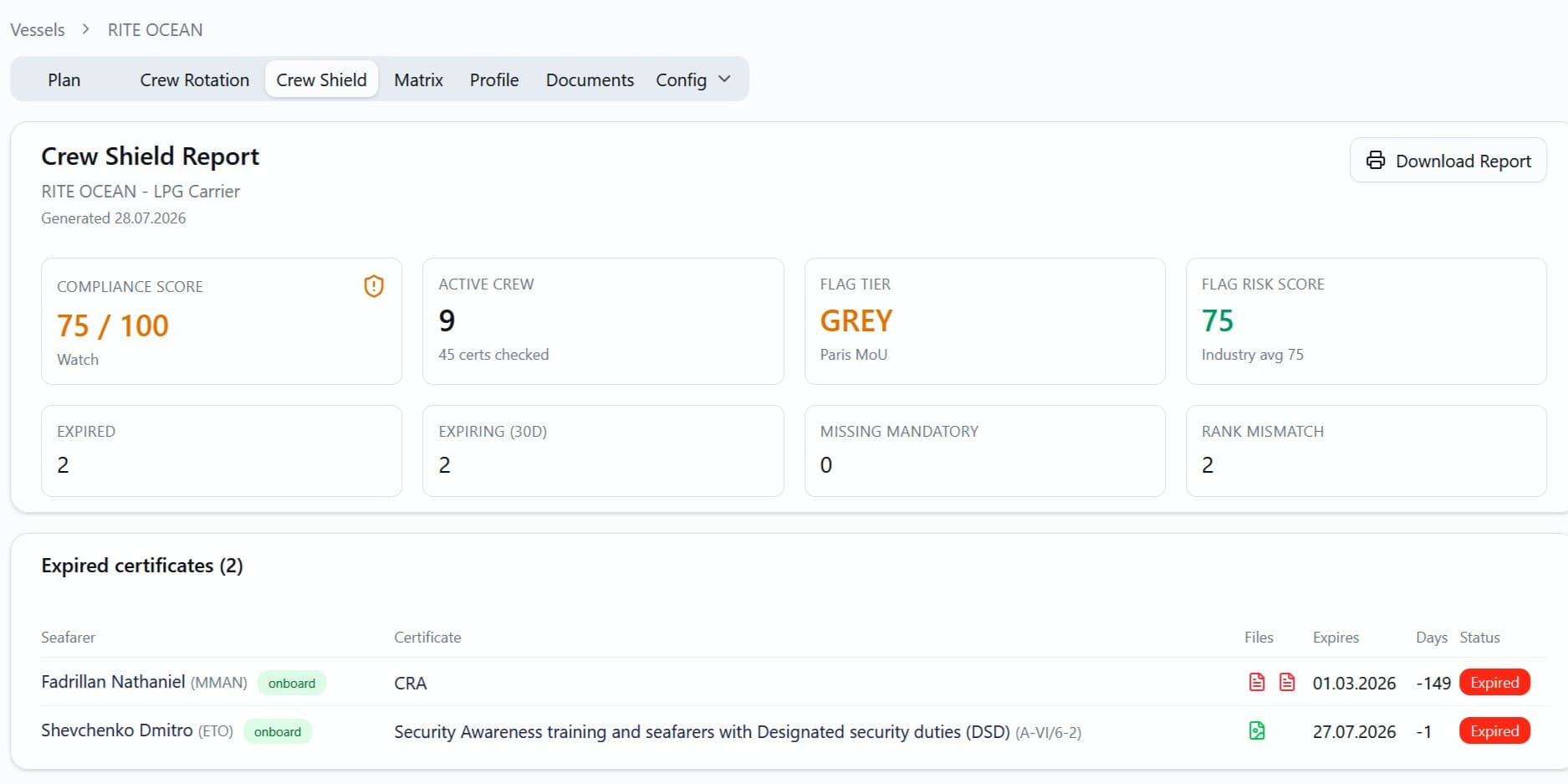
Are we currently sailing with expired certificates?
The Expired table lists every certificate held by the active crew (onboard plus joining) whose expiry date is in the past. Sorted most-overdue first. Each row shows the seafarer, the rank, the certificate, the days past expiry, and whether the seafarer is currently aboard or about to sign on.
Click any row to open the seafarer's certificate page in a new tab. Renew, replace, or void the document - the next Crew Shield scan reflects the change.
Upcoming
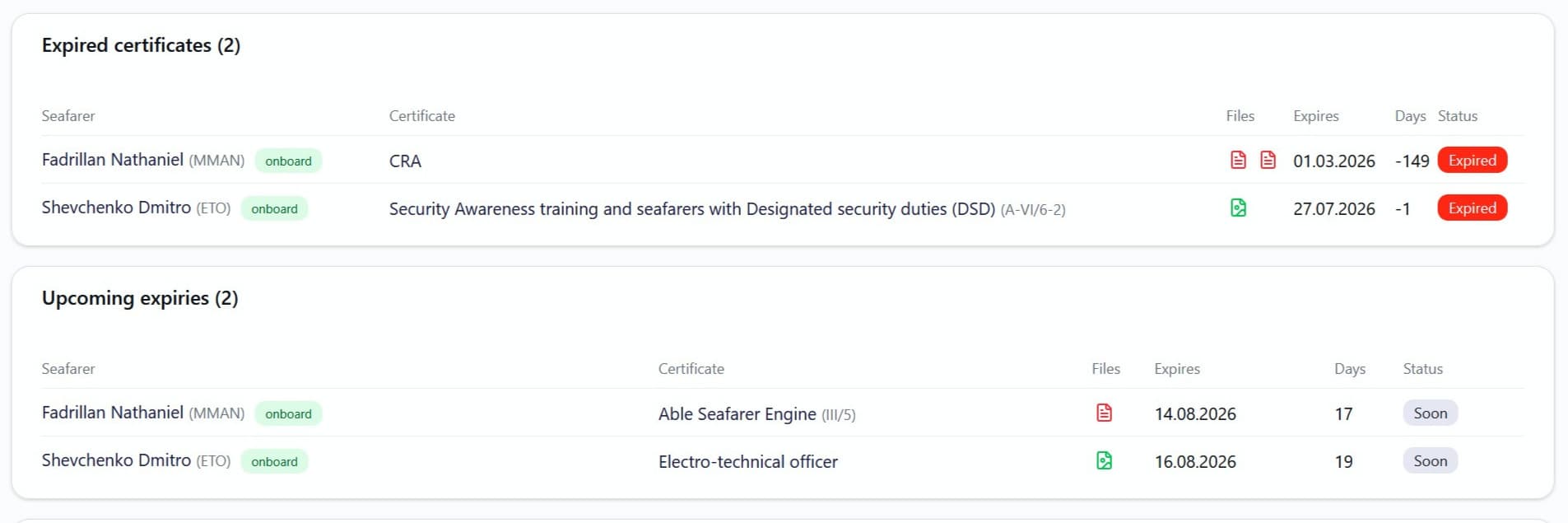
What is expiring in the next 90 days?
The Upcoming Expiries table lists every certificate due to expire in the next 90 days, nearest first. The "Soon" sub-status (within 30 days) feeds the headline KPI strip; the full 90-day window catches the rest before renewal slots at busy crewing hubs fill up.
Use it when planning crew changes. If a joining 2/E's COC expires four days after sign-on, you want to know now, not mid-contract.
Missing
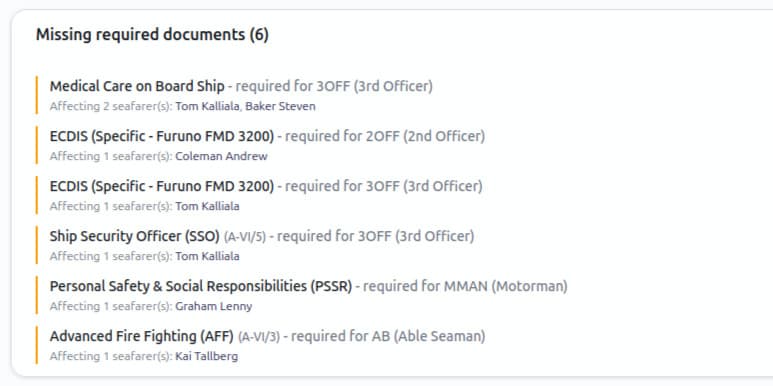
Who is missing a required document for their position?
Every vessel position declares the documents its role requires: passport, medical, COC, GMDSS for the radio officer, and so on. The Missing Required Documents table walks the active crew position by position and flags anyone without the matching document.
It groups by rank and document, so a line reads "this document, required for this rank, is missing on these seafarers." Source the document or re-staff the position before anyone boards.
Flag risk
How does our flag stack up on the Paris MoU list?
Paris MoU publishes a White / Grey / Black performance list every year. Vessels under a low-tier flag attract more frequent Port State Control inspections and stricter scrutiny. RiteCrew carries the current list as a per-flag risk score, expressed on the same 0-100 scale as the compliance score so the two can be read side by side.
The vessel's flag risk score appears in the KPI strip, with the global industry average shown as the comparison datum. A high-compliance vessel under a black-list flag still gets inspected more often - that is a planning fact, not an insult.
Every flag sits on the Paris MoU White / Grey / Black performance list. RiteCrew turns that standing into a 0–100 flag score, read on the same scale as the compliance score.
Flag tier
Grey
Paris MoU
Flag score
70
of 100
Industry avg
84
all flags
- White — Low-risk flags — baseline Port State Control inspection frequency.
- Grey — Elevated scrutiny — targeted more often than white-list flags.
- Black — Frequent inspections, especially on EU port calls.
Illustrative sample. The Paris MoU list lives in one shared module — the same data powers the free Port State Risk Map.
Curious what your fleet's flag mix looks like before you book a demo?
Try the free Port State Risk Map - enter your vessels and get the Paris MoU exposure profile in seconds.
The score
How the compliance score is built.
A single number is dangerous if nobody knows where it came from. Here is the full formula.
It starts at 100
Every vessel begins the scan with a score of 100. Penalties subtract from that. Higher is better.
Expired certificates - heavy penalty, category-weighted
An expired flag-state document is heavier than an expired generic certificate. Categories: flag, medical, STCW, visa, other. Each has its own penalty weight, tunable in crew-shield.constants.ts.
Missing required documents - fixed heavy penalty
A position requiring a passport that the assigned seafarer does not hold is a flat penalty, regardless of category. The position cannot be filled correctly without it.
Rank / position mismatch - moderate penalty
A seafarer assigned to a position whose rank does not match their certified rank. PSC inspectors flag this routinely. RiteCrew flags it before they do.
Expiring soon - light penalty, also category-weighted
A flag certificate expiring in 12 days is heavier than a generic certificate in the same window. The category weighting matters here too.
Bands
Penalties are capped per crew member so a tiny crew with everything expired cannot push the score below zero. The final score lands in one of three bands:
A sample vessel scoring 66 — Watch after four penalty groups are applied.
Penalty weights are per category and tunable — the shape of the drop changes with your configuration, the method does not.
Traceability
Every flagged row traces back to a record.
In RiteCrew, the compliance scan is not a report - it is a live view of the same records the seafarer profile and contract use. Every expired certificate row links to its SeafarerCertificate. Every missing-document row links to the seafarer and the position. Every change (renewal, replacement, void) flows into the audit log.
When a flag-state auditor asks "how did you know this seafarer was compliant?" you produce one screen, not a binder. Click the certificate. See the file. See who uploaded it, when, and which contract it served.
- Vessel1
- Position2
- Seafarer3
- Certificate4
- File5
- PDF6
Audit log
Every hop writes an entry — who changed it, what changed, when, and which contract it served.
Comparison
How Crew Shield compares to spreadsheets and certificate-tracker tools.
| Capability | Spreadsheets | Generic certificate tracker | RiteCrew |
|---|---|---|---|
| Per-vessel scope (not per-seafarer flat list) | Partial | ||
| Tied to live crew assignments (onboard + joining) | Partial | ||
| Compliance score with weighted penalty model | |||
| Paris MoU flag-risk score on the same 0-100 scale | |||
| Missing-required-documents per position | Partial | ||
| Rank / position mismatch detection | |||
| Inline file preview from the dashboard | Partial | ||
| Printable PDF compliance report per vessel | Partial | ||
| Audit log per record (renewal, replacement, void) | Partial | ||
| Flat-rate pricing (no per-vessel multiplier) | n/a |
Generic certificate trackers tell you when a piece of paper expires. Crew Shield tells you whether the vessel sailing tomorrow passes inspection.
FAQ
Frequently asked questions about Crew Shield.
What counts as an "active" crew member for the scan?+
The scan covers seafarers with an assignment of status onboard or joining on the vessel. Planned crew (assignment exists but the contract has not started) are excluded by default - their certs may legitimately be renewed before they board. Adjust the gate in the service if your office wants planned crew included too.
Where does the Paris MoU flag-risk score come from?+
Paris MoU publishes a White / Grey / Black performance list every year, ranking flag states by their PSC inspection performance. RiteCrew encodes the current list as a per-flag 0-100 score (higher = safer) so it can be displayed alongside the compliance score. The dataset lives in one shared module and is refreshed annually.
What if a position requires a document that does not exist as a record type?+
Position requirements are configurable. Open the vessel's Requirements tab, pick a position, and toggle the certificates that role must hold. The Missing Required Documents scan reads from that configuration, so adding a new requirement immediately surfaces any current gaps.
Are expiry dates assumed in any timezone?+
All expiry math runs at UTC midnight. A certificate expiring 2026-06-30 expires at the start of that UTC day, no matter where the user is browsing from. This matches how the rest of RiteCrew handles dates (BOC, EOC, sign-on, sign-off) and prevents one-day-off arguments at audit time.
Can the compliance score be tuned?+
Yes. Penalty weights (per category, per rule), the "expiring soon" window, and the "expiring watch" 90-day window are all constants in crew-shield.constants.ts. Edit the file, redeploy, and every subsequent scan uses the new weights. There is no UI for it yet - the values are tuned in code so a misconfiguration cannot be created at 2 a.m. by accident.
Does the PDF report run on every page load?+
No. The PDF renderer (Anthropic's @react-pdf/renderer) is lazy-loaded - it does not enter the page bundle until the user clicks "Download Report." That keeps the Crew Shield page itself fast even though the PDF itself is a substantial chunk.
What documents does "Missing Required Documents" actually cover?+
Whatever each VesselPosition declares it requires. In practice that means passports, medicals, visas, COCs, STCW endorsements, Yellow Fever vaccination, and any flag-specific or charterer-specific document the position lists. The label is "Missing required documents" rather than "missing endorsements" because "endorsement" is a narrower regulatory term.
How is this priced?+
Please visit the main page of our website for the full breakdown.
See it in action.
Book a 20-minute live demo. We will run the Crew Shield scan on a representative sample vessel. You will see exactly which certificates are expired, which are expiring, and which positions are short of paper. No slides. No qualification call.
Free migration available · live in under a week · cancel anytime