
Built at sea · Audit-ready · GDPR-compliant · Flat-rate from €197/mo
The Seafarers module
One profile, eight ways to use it.
Every seafarer in RiteCrew has one profile with eight tabs, each built for a specific job. They aren't separate modules bolted together. They pull from the same data, hold each other to the rules, and keep your records straight so you don't have to keep track yourself.
Profile and search
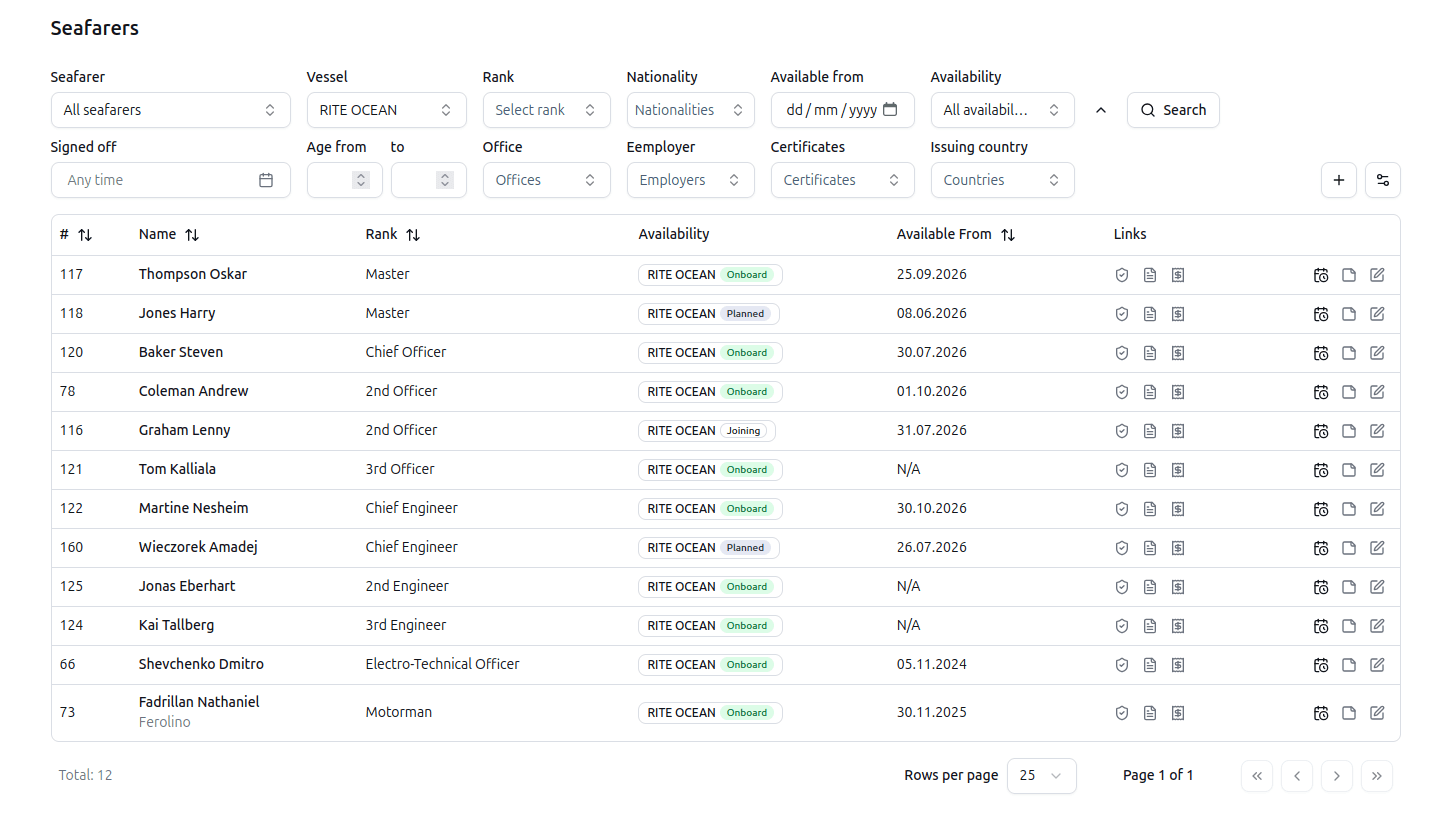
Find any seafarer in under three keystrokes
Filter by rank, availability, vessel, or any combination - then jump straight into their profile.
Each profile carries the full operational state: current rank, availability status, assigned vessel, active contract, and the next certificate expiry. One screen. No tab-switching to answer "is this person ready to fly tomorrow."
Crew document compliance
One place for every document. Linked to vessel requirements.
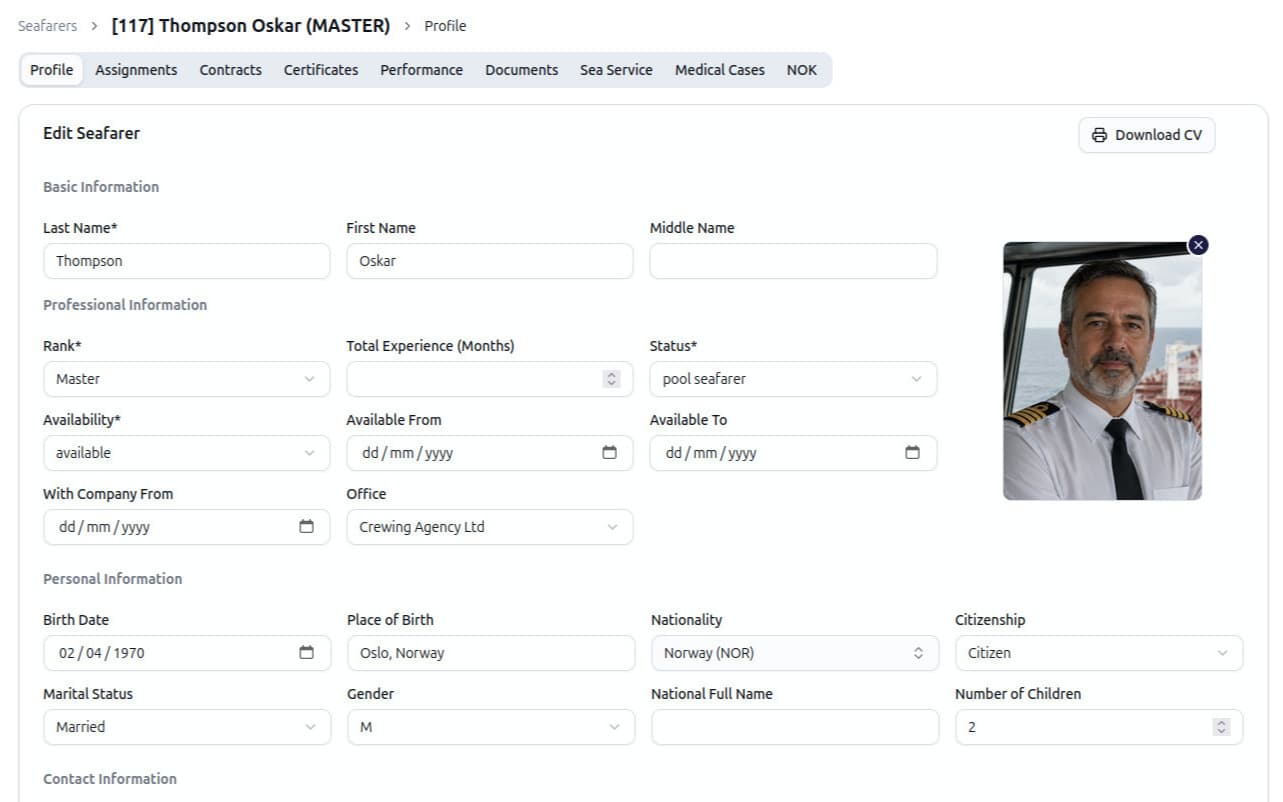
Every document - passports, seaman's books, visas, training certificates, medical fit-to-work - lives in one place, with category, expiry date, and a direct link to the vessel and rank requirements that need it.
When a document is 30 days from expiry, the system flags it.
- Categories covered: Identity, Medical, Contracts, Visas, Training, Appraisals, Certificate, Renewal, Other.
- Expiry tracking: Per document, per rank requirement, per vessel requirement.
Performance reports
Extracted from PDF. Automatically.
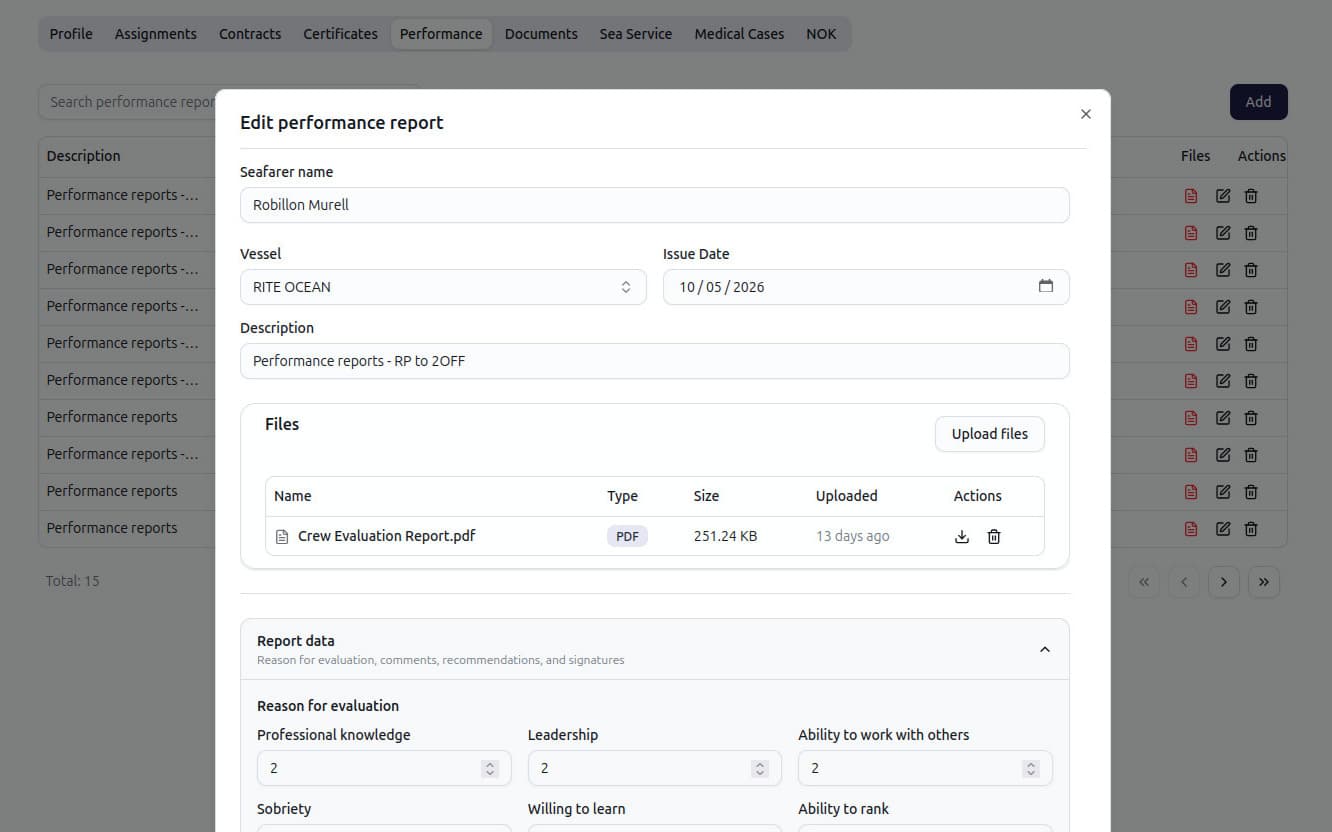
Most operators receive crew performance evaluations as scanned PDFs from the vessel. The standard workflow: open the PDF, retype 20 fields into a spreadsheet, file the PDF in a folder no one will open again. RiteCrew skips the middle step.
Upload the PDF. The system reads it - the seafarer's name, vessel, rank, evaluation date, all ten competency scores, the head-of-department comment, the master's comment, and the reemployment recommendations. The structured data is written to the seafarer's Performance tab. The PDF stays attached for the audit trail.
Sea service history
Every contract becomes a sea-service line.
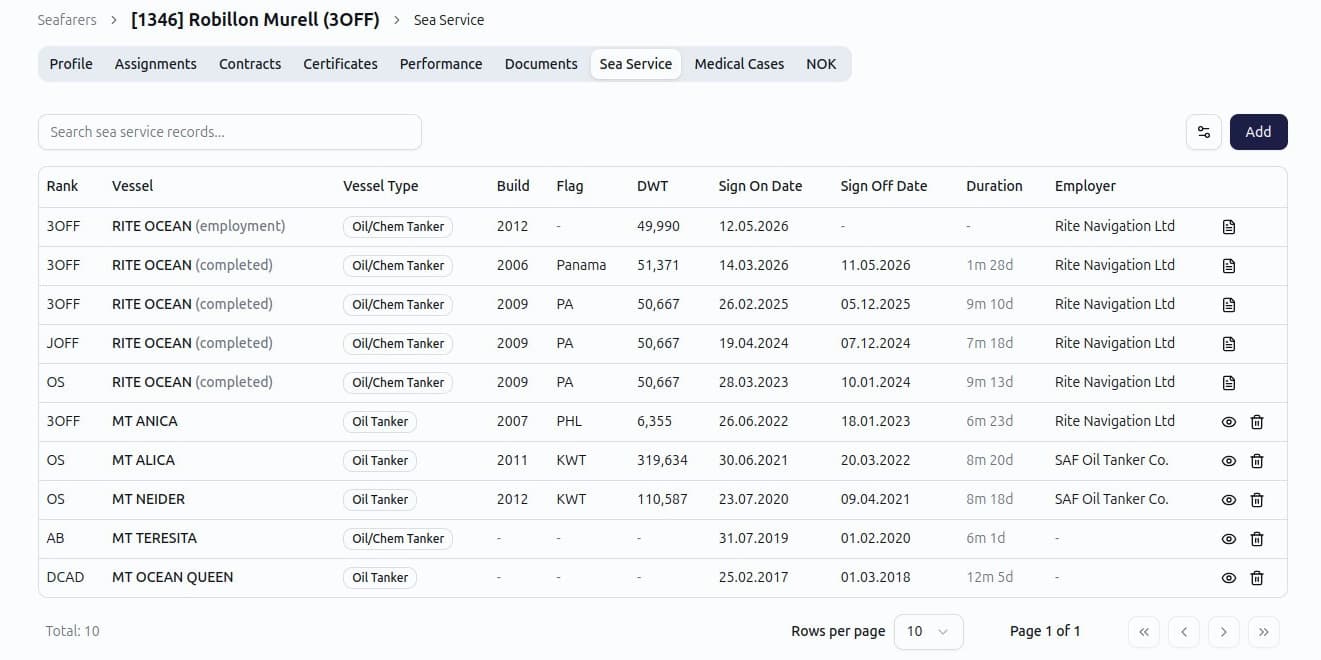
Every contract a seafarer has ever served on becomes a sea-service line. The total months at sea, time on the current rank, time on the current vessel type - is calculated for you.
Sea service ties back to the original contract: the vessel, the BOC/EOC dates, the rank, the sign-on and sign-off ports.
Contracts and assignments
Every contract live-linked to payroll.
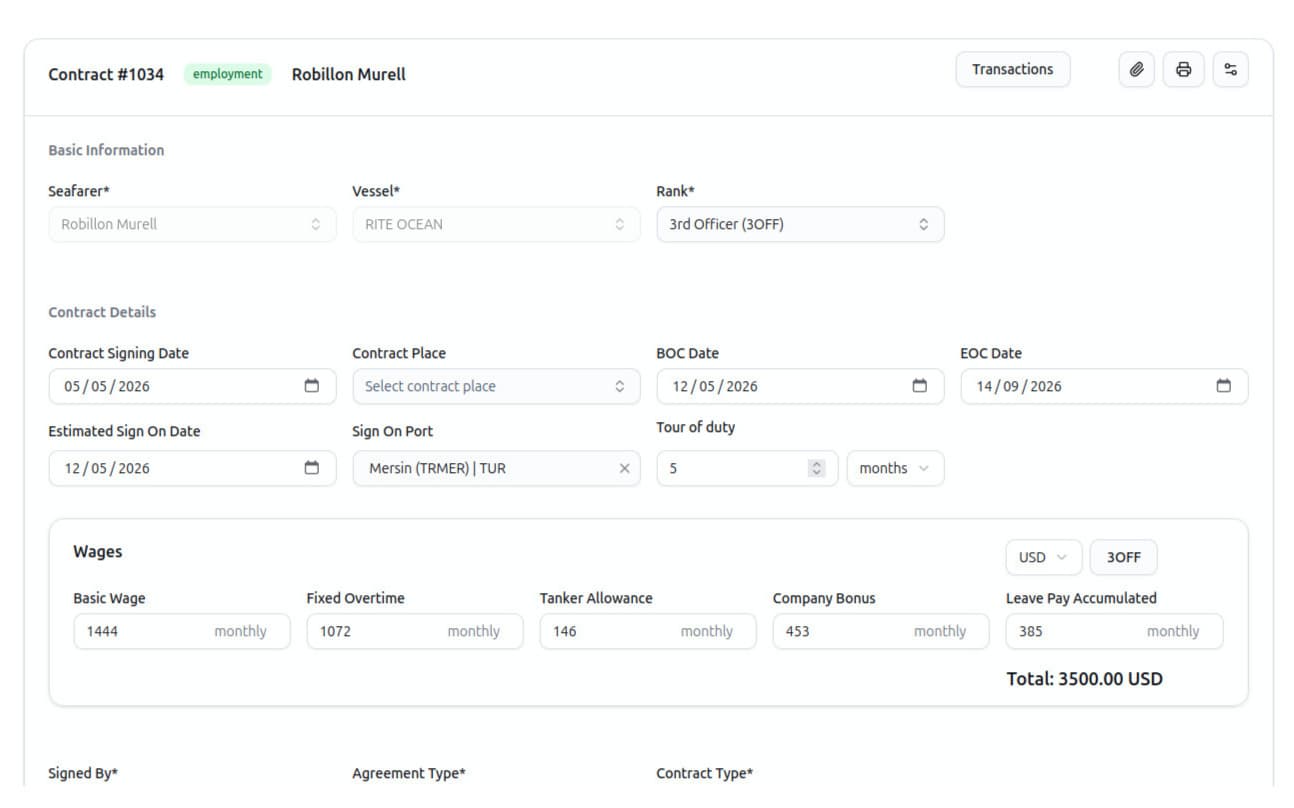
Every contract a seafarer signs - past, current, or planned - lives on their profile. The contract defines the wage structure, the BOC/EOC dates, the vessel assignment, the rank, the joining and signing-off ports. All of it feeds payroll directly when the contract goes live.
Need to issue a new contract? Pick a template.
Mobile seafarer portal
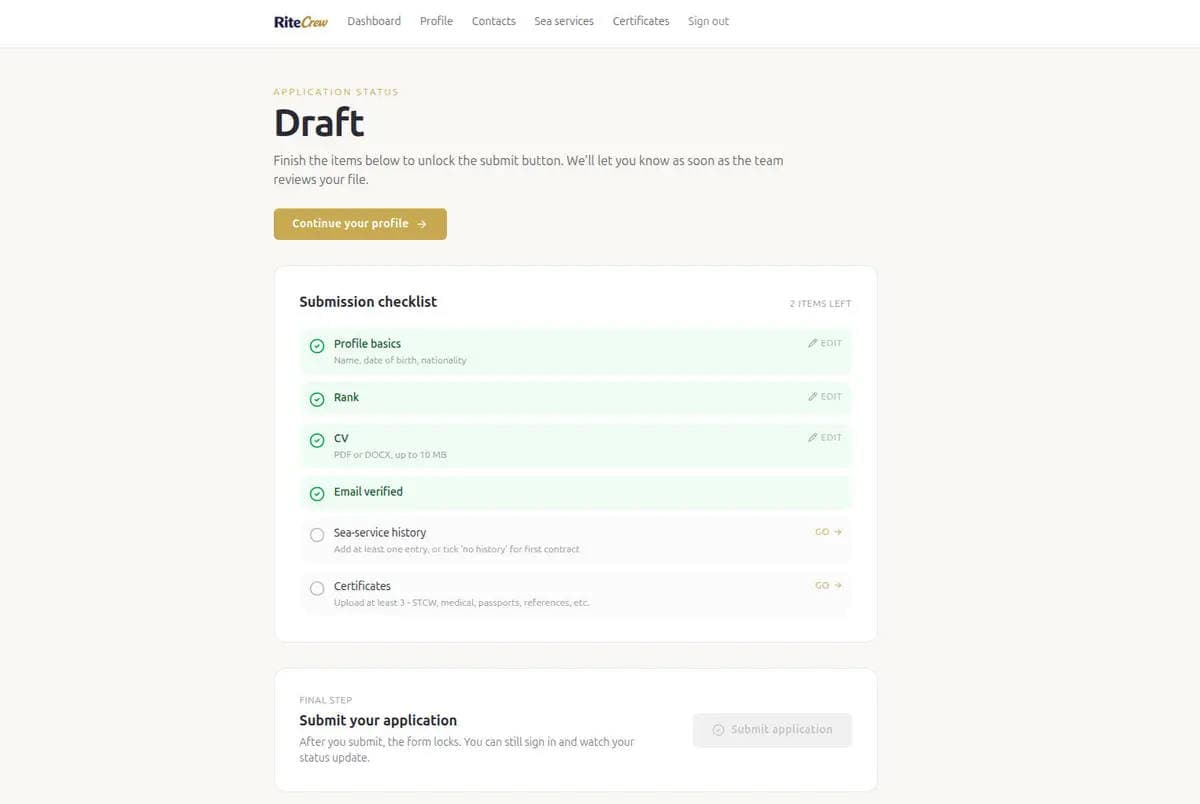
Seafarers upload their own documents. From their phone.
The RiteCrew mobile portal is available now. Seafarers upload their passports, certificates of competency, medical certificates, and visas straight from their phone - no more chasing photos over WhatsApp or email.
Every upload lands in the office Documents tab, already categorised, dated, and logged - so the record is complete before the seafarer ever joins.
- Self-service upload: Identity, Medical, Training, Visas, Certificate.
- Works in any phone browser - nothing to install.
- Every upload categorised, dated, and logged for the audit trail.
Crew list exports
Immigration, IMO lists and Letter of Guarantee in one click.
Every port call needs paperwork. Some ports want the Immigration crew list in their specific format. Flag-state inspectors want the IMO crew list. Your office wants the same data in a clean spreadsheet for the operations dashboard. Three different documents, same underlying data, three different tools to produce them - that is the spreadsheet era.
RiteCrew generates all three from the same crew list. Select the vessel. Select the period. Click export. The Immigration PDF, the IMO PDF, Letter of Guarantee and the Excel sheet are produced from the live record - no copy-paste, no version drift.
Immigration crew list (PDF)
Generated to the format expected by port immigration authorities. Includes passport details, seaman's book, joining and signing-off ports, and signature blocks.
IMO crew list (PDF)
Compliant with IMO FAL form 5 conventions. Auto-populated from your active vessel assignments. No retyping, no template hunting.
Letter of Guarantee (PDF)
The Letter of Guarantee generated straight from the live contract. Seafarer, rank, vessel, employer entity are populated automatically. One click, signature-ready, every time.
Comparison
How RiteCrew compares to spreadsheets and legacy tools.
| Capability | Spreadsheets | Legacy crew systems | RiteCrew |
|---|---|---|---|
| Unified seafarer profile (8 linked tabs) | Partial | ||
| Certificate expiry tied to vessel requirements | Partial | ||
| Automatic sea-service generation from contracts | |||
| PDF performance report extraction (AI) | |||
| Immigration + IMO + Excel crew list in one click | Partial | ||
| Mobile portal - seafarers upload their own documents | |||
| Full audit trail per record | Partial | ||
| Flat-rate pricing (no per-vessel multiplier) | n/a | ||
| Modern web UI (no installation) | Spreadsheets |
The middle column is being generous. Most legacy tools were built in the early 2000s and still require an installation, a database administrator, and a five-figure annual licence.
FAQ
Frequently asked questions about the Seafarers module.
How long does it take to migrate our existing crew records into RiteCrew?+
Most operators are live within a week. Our team imports profiles, certificates, and sea-service history directly from your existing spreadsheets - no manual re-entry. Free data migration is included on a 6+ month contract.
Can we control who sees what?+
Yes. Role-based permissions are configured per entity (seafarer, vessel, contract, payroll, certificate, etc.) with create / read / update / delete granularity. Auditors can read everything; junior crewing assistants can be restricted to their assigned vessels. Every write is recorded in the audit log.
Can seafarers upload their own documents from their phone?+
Yes. The RiteCrew mobile portal is available now. Seafarers upload their own passports, certificates of competency, medical certificates, and visas straight from their phone - it runs in any phone browser, with nothing to install. Every upload lands in the office Documents tab, already categorised and logged - no more chasing photos over WhatsApp or email.
How is this priced?+
€197 per month for the Crewing Agency plan, €397 per month for the Vessel Operator plan. Flat rate either way - no per-vessel multiplier, no per-seafarer fee. See the pricing page for the full breakdown.