
Maritime Insights · Crew Management
Automatic CV import: how maritime crew management software should read a seafarer's CV
Maritime crew management software holds a seafarer's whole working life. Almost all of it arrives as a CV. In most crewing offices, somebody then types that CV into the database by hand.
RiteCrew now reads the CV instead. Upload a PDF, a Word file or a scan and about a minute later the profile, certificates, sea service and next of kin are on screen with a tick box against every field. You check, you save. This post covers what gets extracted, what happens when a seafarer is already on file and what to ask any vendor of ship crew management software before you trust their version of the same feature.
Typing a CV into a database is a job nobody should still have
A seafarer's CV runs to two or four pages with twenty personal fields, a next of kin, a page of certificates with numbers and expiry dates and ten to thirty sea-service lines with vessel names, IMO numbers, tonnage, engine power and dates. Typed by hand, that is twenty to forty minutes per person. A wrong digit in an expiry date goes straight into the crew list and from there into a contract.
A crewing office receives dozens of CVs a week. Most never get entered. The candidate sits in an email folder until somebody has an hour spare and by then the vacancy is filled. The pool the office thinks it has and the pool it can actually search are two different sizes. That gap is the real cost of manual entry and it is why CV import belongs in the core of any marine crewing software, not in an optional add-on.
What automatic CV import means
Automatic CV import is a function of maritime crew management software that reads a seafarer's CV, whether PDF, Word or a scanned image and fills the seafarer record from it: personal details, next of kin, certificates with expiry dates, sea-service history and identity documents. The office reviews each extracted field against the original before anything is saved.
Four steps. The office does the last one.
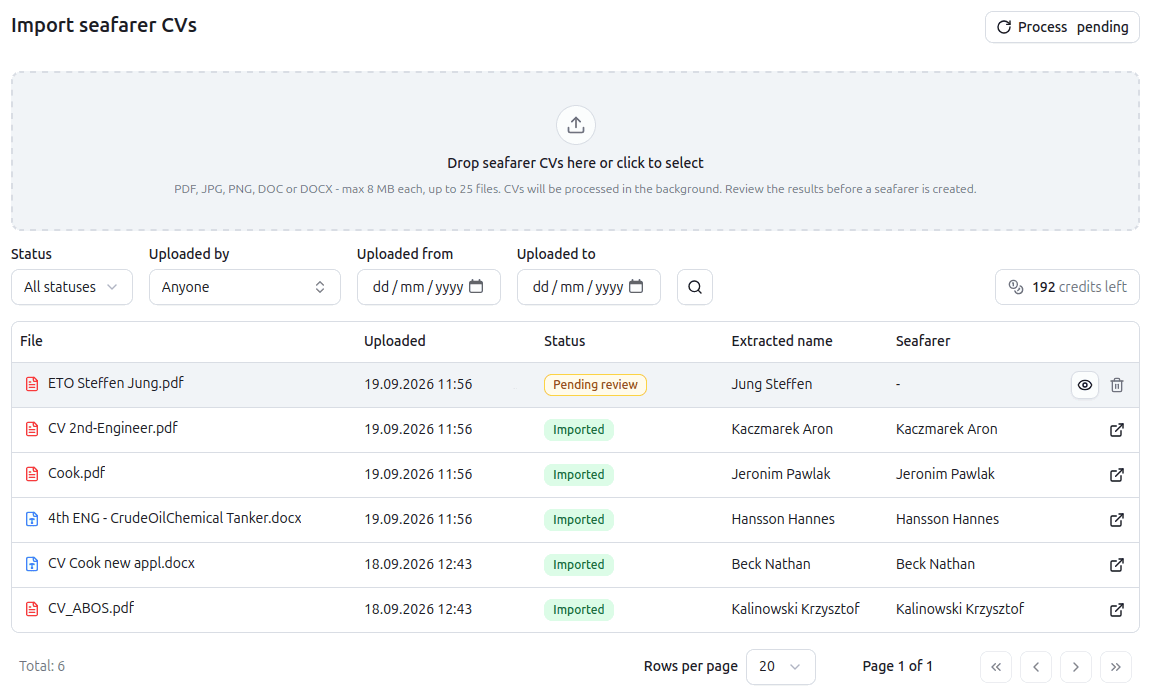
- Upload. Upload up to 25 CVs at once from the Import CVs page. PDF, Word (.doc and .docx) and image scans (JPEG, PNG, WebP) up to 8 MB each.
- Read. RiteCrew reads the document, scanned pages included. This takes 30 to 90 seconds. Batch uploads run in the background while you carry on working.
- Review. The extracted data opens next to the original CV. Untick anything you do not want. RiteCrew matches ranks to your own rank list.
- Save. RiteCrew writes the ticked fields to the seafarer record. Certificates, sea-service lines and contacts become ordinary rows, each logged with the import they came from.
The review step is the point. A system that saves whatever it read, with no tick boxes and no original alongside, has moved the typing error rather than removed it. The office still owns the record. The software just does the keyboard work.
What comes off the page
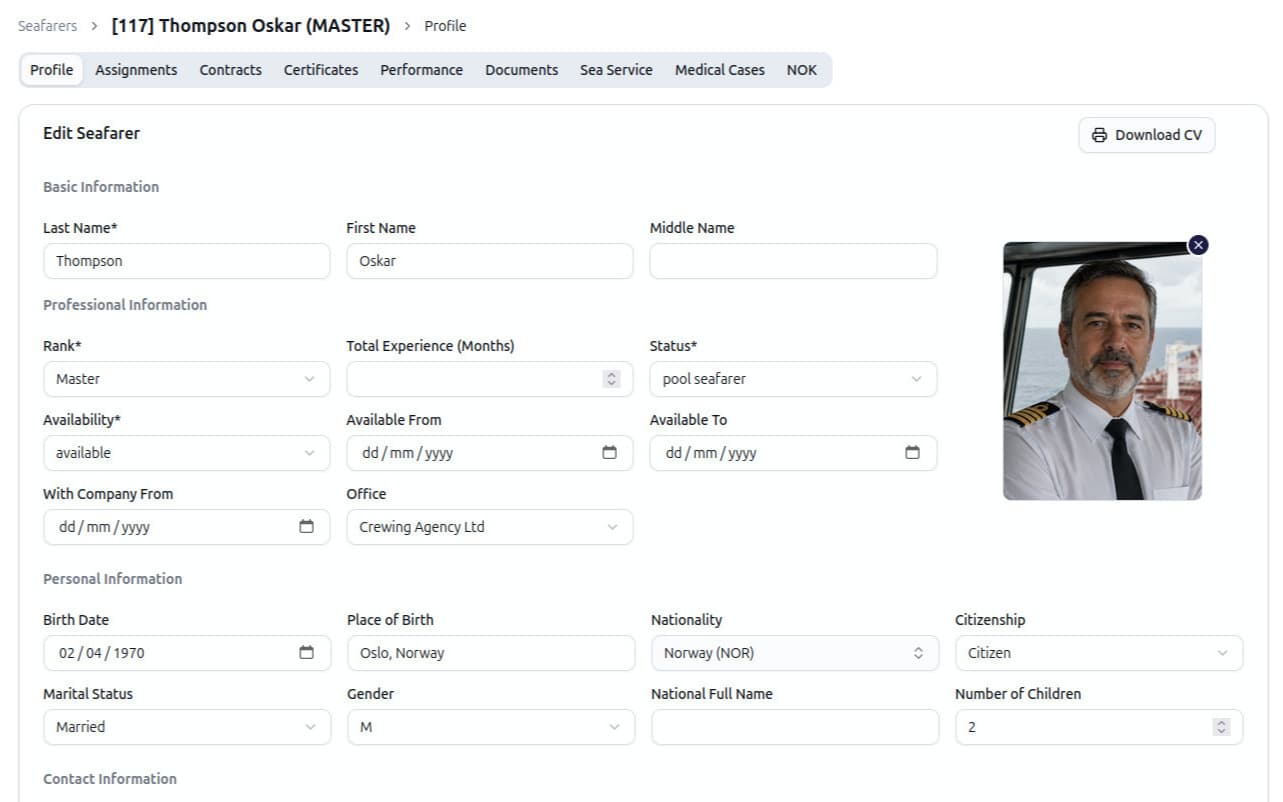
- Personal details. Surname, first and middle names, date and place of birth, nationality, gender, marital status, number of children, address, phone, mobile, email, nearest airport, current rank, available-from date, total sea time and personal ID number.
- Next of kin. Name, relationship, phone, email and address.
- Sea service. For each line: vessel name, IMO number, vessel type, flag, build year, tonnage (DWT or GT), length overall, engine maker, model and power, DP class, rank held, sign-on and sign-off dates, employer and crewing company.
- Certificates. Every certificate on the CV: name, number, issuing country, issue date and expiry date. RiteCrew matches each one to your certificate list. A certificate that is not in your list you may map or add a new certificate name before saving.
- Documents. Passport, seaman's book, visas and medical certificate, each with number, issuing country and dates.
- Photo. If the CV carries a portrait, RiteCrew finds it and offers a crop. Accept it, or adjust it and it becomes the profile photo.
Updating a record never overwrites it
If a new CV matches an existing seafarer by name and date of birth, a banner says so before anything is created. Duplicate seafarers are normally found months later, at sign-on, when two records for the same person carry two different
A folder of CVs, not one at a time
The Import CVs page takes up to 25 files in one go. Each file is queued, read and listed with its status: processing or ready for review. Open a row to review and save it. You may filter uploads by status, uploader or date. The backlog in the email folder becomes a list the office can work through in an afternoon and the candidates in it become searchable the same day.
One credit per CV
Each CV read uses one OCR credit. The balance shows on the import page. The Crewing plan includes 25 credits per month, while the Operator plan includes 50. If you need more, simply purchase additional credits for OCR imports. The subscription itself stays a flat monthly rate whatever the fleet size.
The CV itself is stored as a document on the seafarer record, in your own encrypted storage, so the original is always one click away from the fields that came out of it.
Compared with typing
| By hand | RiteCrew CV import | |
|---|---|---|
| Time per CV | 20 to 40 minutes | 30-60 seconds reading, 1 to 3 minutes checking |
| Sea-service lines | Typed one by one | All lines at once, each with a tick box |
| Certificates | Typed one by one, dates mistyped | Read from the CV, matched to your list, dates checked against the original |
| Rank names | Whatever was typed | Matched to your rank list |
| Duplicate seafarers | Found later, usually at sign-on | Flagged before saving |
| Scanned CVs | Retyped from the image | Read like any other file |
What to ask any vendor of marine crewing software about CV import
Several ship crew management software vendors now list CV parsing on the feature page. The word covers very different things. Five questions sort them out and the answers are easy to check in a demo if you bring your own CVs.
- Does it read scans? A seafarer CV may arrive as a photo or a scan of a printout. Text-only parsing leaves those to be retyped.
- Does sea service come through as rows? Some tools put the whole history in a notes field. That is not searchable and cannot feed a contract or a rank-experience check.
- Are certificates matched to your own list? A certificate saved under the CV's spelling rather than your list's entry will not trigger an expiry alert and will not show in a compliance scan.
- Can you see the original while you check? If the review screen does not show the CV beside the extracted fields, the check slows you down.
See where CV import fits into a crewing platform in our guide to maritime crew management software and what it costs The same reading approach handles vessel transaction PDFs on the payroll side.
Frequently asked questions
Which files can I upload?
PDF, Word (.doc and .docx) and JPEG, PNG, GIF or WebP images, up to 8 MB each. Up to 25 files can be uploaded in one batch from the Import CVs page.
Does it read scanned CVs?
Yes. Scanned pages and photographed CVs are read the same way as text PDFs. A poor-quality scan produces more fields to check in the review step, but nothing has to be retyped from the image.
How accurate is automatic CV import?
Very accurate on a clean document. It is still worth checking the import, because CVs carry certificate names spelt several ways and a poor scan can produce recognition errors. Every field has a tick box and the original CV stays on screen, so a review takes a minute or two rather than the twenty to forty minutes of typing it replaces.
What if a rank or certificate is not in my list?
The line still comes through. A rank that is not recognised is left blank for you to pick from your rank list before saving. A certificate that is not in your list arrives with the name from the CV, and you map it to an existing entry or add a new one. Nothing is dropped.
Do imported certificates show in expiry alerts?
Yes. Once saved they are ordinary certificate rows. Expiry status, the Crew Matrix, Crew Shield and reminder emails treat them like any other certificate.
Can I import a CV in another language?
English CVs are supported at present. Dates and vessel data are read regardless of the document language. If you need another language, contact us and we will test it with your documents and work with you on a solution.
What happens to the CV file?
It is saved as a document on the seafarer record, in your own encrypted storage, so the original is always one click away from the fields that came out of it.
Is there a monthly limit on CV imports?
Each CV import uses one OCR credit. The Crewing plan includes 25 credits per month, while the Operator plan includes 50. If you need more, simply purchase additional credits for OCR imports. import page and in Settings.
Send us your CVs. Watch them go in.
Bring your CVs to the demo, one of them a scan. We import them live and you check the result against the originals, in your own rank list and your own certificate list. Book a 20-minute demo, read the CV import feature page, or look at the seafarer record the import fills first. No slides. Your CVs, your rank list.
Published