
Maritime Insights · Payroll
Maritime Payroll Processing Software: flat rate 397 EUR/month
Generic payroll software runs salaries for office workers paid the same amount, on the same date, in the same currency, in the same country. None of that is true at sea. Maritime payroll processing software exists because every one of those assumptions breaks on a vessel.
This guide breaks down what proper maritime payroll processing software has to handle - the eight workflows that turn a contract into a payslip the seafarer actually trusts, the flag-state auditor accepts, and the finance team can close the month with.
RiteCrew maritime payroll processing software
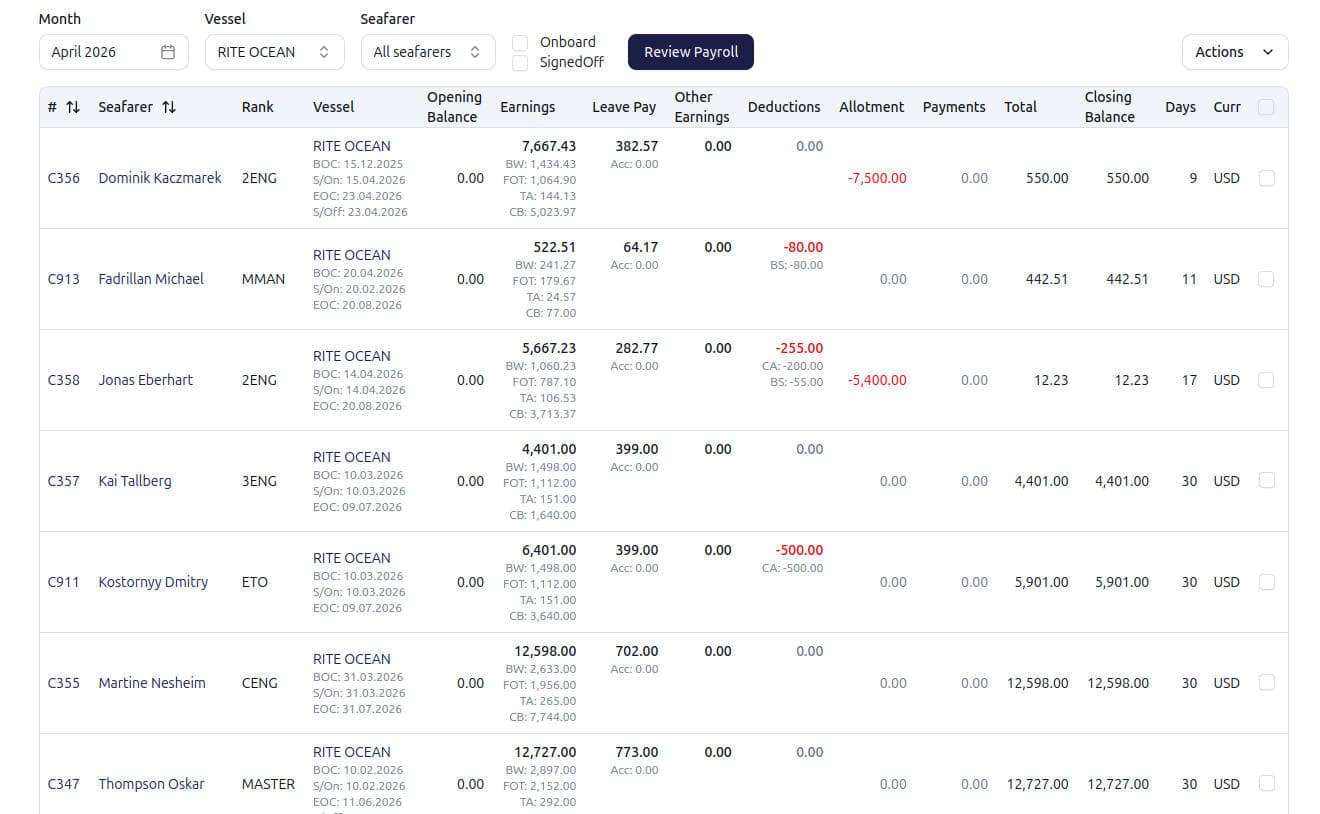
Maritime payroll processing software calculates seafarer wages from active contracts: prorating partial months, handling multi-currency allotments, applying rank-specific allowances, importing vessel-side transactions, producing versioned PDF payslips, and recording every line in an audit log. It replaces a Word contract, a spreadsheet calculation, a separate PDF tool, and an inbox of vessel paperwork with one workspace tied to the live crew.
Why generic payroll software does not work at sea
A normal payroll engine takes a salary, divides by 12, applies tax tables for the employee's country of residence, deposits a single currency into one bank account, and stops. That works for an office. It does not work for a Filipino 2/E on a Marshall-Islands-flagged tanker, whose contract pays a basic in USD, a fixed overtime in USD, a tanker allowance in USD, and an allotment in PHP to his wife in Manila, while the crew member himself signs off mid-month at a sign-off port that determines his final settlement date.
The difference is not configuration. It is structure. Maritime payroll processing software treats the contract as the source of truth, not the calendar month. Every calculation traces back to a contract. Every contract traces back to a vessel and a rank. Every change is logged. Generic payroll software was not built to do any of this - and adding it later is harder than it sounds, because the underlying data model assumes salaried employment.
Eight workflows proper maritime payroll processing software has to handle
Below is the operating list a crewing manager and a finance lead will walk through when they evaluate vendors. If a tool cannot do all eight cleanly, it is a spreadsheet with a login screen.
1. Contract templates with merge fields
Different flag states, different employers, different vessel types. A proper system stores a contract template per agreement type, with merge fields for seafarer, rank, vessel, employer, sign-on / sign-off ports, basic wage, fixed overtime, allowances, and accumulated leave pay. Issue a contract, the template interpolates with live data, and the PDF lands on the seafarer's profile alongside their certificates and sea service and on the contract record. No re-typing into Word.
2. Multi-currency wages, allowances, and allotments
The basic wage in USD. The tanker allowance in USD. The allotment to the spouse in PHP, EUR, or UAH. The cash advance handed out at the last port in the port currency. The payslip has to show every line in its native currency and the consolidated total in the contract currency - calculated against the historical rate that applied on the transaction date, not today's rate.
3. Partial-month proration
A seafarer joining on the 15th does not get paid a full month. They are paid for the days they actually served. Proper maritime payroll processing software counts the served days inclusively and prorates each wage component against a standard 30-day month - identical math for every calendar month, regardless of whether the month is 28, 30, or 31 days. This is where most generic payroll tools produce off-by-one errors that surface as crew disputes.
4. Accumulated leave pay with automatic final settlement
Leave pay accrues during the contract as a running balance, not as a regular monthly payment. When the contract closes, that accumulated balance is paid out as part of the final settlement on the closing payslip - automatically flipped from deduction to earning. No manual journal entry. No spreadsheet to reconcile against the contract end date.
5. Vessel-side transaction import (slop chest, cash advance, allotment)
Vessels send paperwork. A proper system reads the PDF or Excel file the vessel sends, extracts each line (seafarer, rank, amount, currency, date), matches rows to the right active contract on the payment date, stages the batch for review, and posts the confirmed transactions into the next payroll period. The workflow that used to take an afternoon of retyping becomes a five-minute review. Read the full deep-dive on vessel transaction import.
6. Versioned payslips with snapshot, not live recalculation
A payslip is a record, not a calculation. Once it closes, it captures the contract terms at the moment of close, every transaction that contributed, opening and closing balance, employment days, and the full line breakdown. It does not silently change if someone edits the contract later. A flag-state auditor in 2028 can pull the 2026 payslip and see what was actually paid - against what terms.
7. Audit log per record
Every contract edit, every payslip close, every cancellation, every retroactive transaction lands in the audit log with the user, the timestamp, and the change detail. This is what turns a payslip from a number into evidence. It is also what an MLC inspector or a flag-state auditor will ask for first.
8. Print-ready PDF output
Email it to the seafarer. Archive it with the employer entity. Hand it to a port-state inspector. The payslip PDF is the boundary between the system and everyone outside it - so it has to look right, carry the employer's branding, show the full breakdown, and print without manual fix-up.
The hidden ones: maritime quirks generic payroll cannot handle
Three scenarios will tell you within minutes whether a tool is real maritime payroll processing software or a generic engine with a maritime sticker on it.
Test 1
Mid-contract promotion
A seafarer is promoted from 3/E to 2/E mid-contract. The old contract closes at the new sub-rank, the new contract opens at the higher rank and wage. Does the accumulated leave pay carry forward, or get paid out twice?
Test 2
Late-arriving slop chest
A May slop-chest line arrives in July, after the May payroll is closed. Does the system assign it to the seafarer's active contract on the payment date and pick it up in the next open period, or does it try to rewrite May?
Test 3
Payslip cancellation
The wrong payslip went out. Can you cancel it cleanly - balance reverts, transactions go back to unbilled, the audit log records the reversal - without deleting the payslip itself or silently rewriting history?
The first answer should be "carries forward, no double-payment." The second should be "next open period, no retroactive rewrite." The third should be "cancelled, not deleted; audit log records the reversal." If the vendor hesitates on any of the three, the tool was built for office payroll and adapted later.
How to evaluate a maritime payroll processing software vendor
A short, blunt checklist for the demo call:
- Ask to see a real contract template editor. If you only see a finished PDF, the template is not really configurable.
- Ask to run a payroll period preview before any payslip is created. If the system commits payslips before you review, the math will surface as a dispute later.
- Ask what happens when a contract closes mid-month. Watch how accumulated leave pay behaves on the closing payslip.
- Ask to import a real vessel PDF. The matching logic is where most vendors lose credibility.
- Ask to cancel a payslip and read the audit log entry. If "cancel" is actually "delete," walk away.
- Ask whether pricing is per-vessel, per-seafarer, or flat. Per-vessel pricing makes the system more expensive as you grow - the opposite of what software is supposed to do.
Why RiteCrew built maritime payroll processing software this way
RiteCrew was built at sea, with crewing managers and finance leads from operators who run multi-currency, multi-flag, mixed-nationality crews every day.
The full module sits behind the Payroll feature page with screenshots and a comparison table. For a budgeting conversation, see our buyer's guide to maritime payroll software cost.
See it on your own crew
Book a 20-minute demo and bring a real scenario - a partial-month sign-on, a contract closing with accumulated leave pay, a vessel PDF that needs to land in payroll. We will run it through RiteCrew live. Or take the platform tour first to see the workspace end-to-end.
Published · Last updated